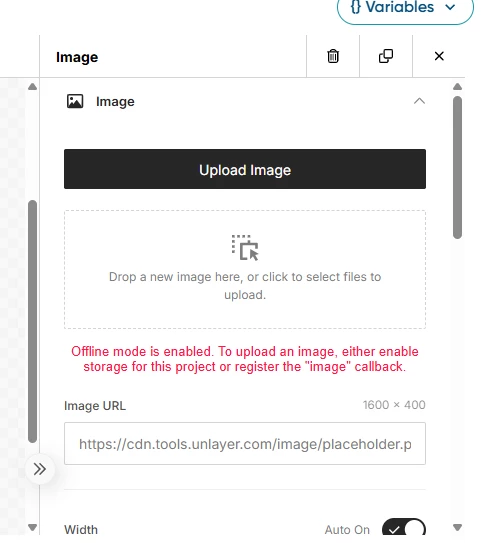
Hi @grant8829, Thanks for flagging this. I have notified your CS team and our support/eng team to take a further look.
Based on similar cases, the “offline mode is enabled” message can appear when the Campaign Builder’s image upload service fails, even if the user is connected to Wi‑Fi and the image file size is valid. This does not appear to be caused by your local connection or the image being under/over 1MB.
As a workaround, you can host/upload the image separately and insert it into the campaign using the image URL rather than the direct image upload button. In parallel, we should have Support review the tenant configuration and confirm whether the custom campaign image upload setting is enabled for your environment. A HAR file from the browser while reproducing the issue would help Engineering confirm whether the upload is being blocked by the underlying image service.