Hi - I have added an item to the app switcher menu and would like to add an icon. But I don’t know what icons there are and what their names are. Is there a list of these somewhere?
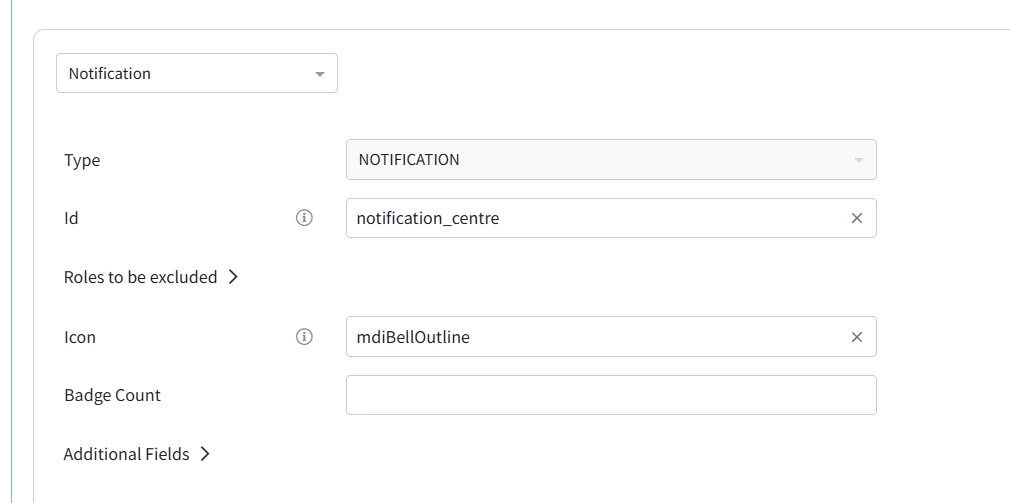
Example below of the Icon field:

Hi - I have added an item to the app switcher menu and would like to add an icon. But I don’t know what icons there are and what their names are. Is there a list of these somewhere?
Example below of the Icon field:
Best answer by dkreiger
Hi
### Font Awesome Icons
- Brands:
- fab fa-studiovinari
- fab fa-stumbleupon
- fab fa-telegram
- fab fa-twitter
- fab fa-whatsapp
- fab fa-wordpress
- Solid Icons:
- fas fa-hospital
- fas fa-image
- fas fa-info-circle
- fas fa-lock
- fas fa-user
- Regular Icons:
- far fa-check-circle
- far fa-heart
- far fa-smile
- far fa-star
For a complete list of available icons and their names, you can visit the Font Awesome website and click on the “Icons” button. This will allow you to search for specific icons by name and find the corresponding code you need to use in your configurations.
If you have any further questions or need assistance, feel free to reach out!
Already have an account? Login
No account yet? Create an account
Enter your E-mail address. We'll send you an e-mail with instructions to reset your password.


